How to commit encrypted files to Git with Mozilla SOPS
It’s a common scenario where it’s needed to share some keys/secrets with other members of the project team and it’s also common that those keys are closely attached to some source code. SOPS allows you to do that securely using Git or other VCS.
A Git repository would be a perfect solution, but Git works in plain text, like any other VCS (Version Control System) for source code, even when the communication channels and storage system are encrypted. That means, if someone has access to the source code, they’ll also have access to all keys inside of the code.
Updated on October 1, 2026: I tested every command again with age v1.3.2 and SOPS v3.13.3, and finished the last section, which was a WIP for years. SOPS isn’t a Mozilla project anymore, it now lives at github.com/getsops/sops. I kept “Mozilla” in the title because that’s how most people still search for it.
If you prefer to watch videos, I recommend you to skip this post and go to the video from the original SOPS creator:
How the encryption process works
SOPS is an editor of encrypted files that supports YAML, JSON, ENV, INI, and BINARY formats and encrypts with AWS KMS, GCP KMS, Azure Key Vault, HashiCorp Vault, age, and PGP.
https://github.com/getsops/sops
We’ll use SOPS in the following example with age (github.com/FiloSottile/age) as the encryption solution. SOPS will be our editor or interface to encrypt and decrypt files using age.
The following diagram represents a flow of how users can share encrypted files with a git repository:
Requirements
- A secure vault. I’m using 1Password for this example.
This vault will be used to store the “age” key. - Both users must have access to the same secrets.
- A secure vault. I’m using 1Password for this example.
Steps
User 1 pushing an encrypted file
1. Get "age" key from 1Password vault
   This is a plain text key.
2. Encrypt files using SOPS
3. Commit files to your local repository
4. Push commit to the remote git repository (like GitHub, GitLab, etc)
User 2 pulling and decrypting the same file
5. Pull commit from the remote git repository
   Also, get the same "age" key from 1Password vault used by "User 1"
6. Decrypt file locally using SOPS
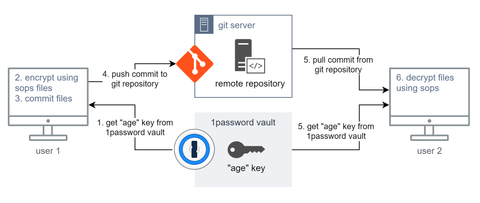
the flow of how to use sops + git
How to encrypt files using age
age is a simple, modern, and secure file encryption tool, format, and Go library:
https://github.com/FiloSottile/age
You can use other encryption methods that could be even better for your use-case, for example, the AWS KMS if you already have an AWS account. That also allows you to use the AWS IAM to manage access to the encryption keys. age is the perfect solution when you have no other encryption method.
First, download the age binary for your system and add it to your path:
# Download the age binary
# the '/usr/local/bin' dir must be in your PATH env
#
# I recommend you to check the GitHub repository for the latest version:
# https://github.com/FiloSottile/age/releases
wget -O /tmp/age.tar.gz \
    https://github.com/FiloSottile/age/releases/download/v1.3.2/age-v1.3.2-linux-amd64.tar.gz
sudo tar -zxv --strip 1 \
    -C /usr/local/bin/ \
    -f /tmp/age.tar.gz \
    age/age age/age-keygen
Now you have the tool to generate your encryption key:
# Create an encryption key with age

# go to a directory to store your key
# I'll consider the '~/project/keys' dir
mkdir -p ~/project/keys
cd ~/project/keys
age-keygen -o curitiba-key.txt

# Now check your key
cat ./curitiba-key.txt
# Should be something like this
# > # created: 2026-10-01T04:16:25Z
# > # public key: age1p44zha87ckmxh62rk3nssvlslj72dmuj0zcedk3hqkk66mzjldgq28qm0v
# > AGE-SECRET-KEY-1VMCQWQURWJLPPTJSRL9VF7RD5A42N5UZ68RLNAE79FP0RDQ7XYPQ64D8VU
It’s not the scope of this tutorial, but I’ll guide you in this simple example of how to encrypt any binary file using exclusively age. Those encrypted files can be committed to a git repository too:
# Encrypt a binary file using age only

# Check your key pair
# public key is in the comment
# private key starts with 'AGE-SECRET-KEY-'
cat ./curitiba-key.txt

# You can also print only the public key
age-keygen -y ./curitiba-key.txt

# Copy 'top' binary as an example binary
cp $(whereis top | cut -d' ' -f 2) ./

# Encrypt the 'top' binary file
# using your public key
# the 'top.age' file will be created
cat ./top | age -r $(age-keygen -y ./curitiba-key.txt) > top.age

# Check the files
ls -lah
# > total 276K
# > drwxrwxr-x 2 luiz luiz 4.0K Oct  1 04:16 .
# > drwxrwxr-x 3 luiz luiz 4.0K Oct  1 04:16 ..
# > -rw------- 1 luiz luiz  184 Oct  1 04:16 curitiba-key.txt
# > -rwxr-xr-x 1 luiz luiz 132K Oct  1 04:16 top
# > -rw-rw-r-- 1 luiz luiz 132K Oct  1 04:16 top.age

# Decrypt using your age key file
age --decrypt -i ./curitiba-key.txt top.age > top-new

# Test if the decryption worked
chmod +x ./top-new
./top-new
# [q] to exit

# Clean up
rm top
rm top.age
rm top-new
How to edit yaml files using SOPS
The first step is to install SOPS, just like we did with age:
# Download the SOPS binary
# the '/usr/local/bin' dir must be in your PATH env
#
# I recommend you to check the GitHub repository for the latest version:
# https://github.com/getsops/sops/releases
sudo wget -O /usr/local/bin/sops \
    https://github.com/getsops/sops/releases/download/v3.13.3/sops-v3.13.3.linux.amd64
sudo chmod +x /usr/local/bin/sops
Now that you have an age encryption key, let’s finally start doing the main part of this post and learn how to create text files encrypted using SOPS.
# Load your SOPS env vars
# you need those environment variables
# in each terminal session

# Check your key pair
# public key is in the comment
# private key starts with 'AGE-SECRET-KEY-'
cat ~/project/keys/curitiba-key.txt

# Set variables
# SOPS_AGE_RECIPIENTS is your public key, used to encrypt
# SOPS_AGE_KEY_FILE is your key file, used to decrypt
export SOPS_AGE_RECIPIENTS=$(age-keygen -y ~/project/keys/curitiba-key.txt)
export SOPS_AGE_KEY_FILE=~/project/keys/curitiba-key.txt
# Create an encrypted file for our project
mkdir -p ~/project/curitiba
cd ~/project/curitiba

# Create a fresh new file
# Set some content
sops config.yaml

# Check the encrypted content
cat ./config.yaml

# Edit the encrypted file content
sops config.yaml
Set the following file content:
games:
    rpg:
        - Yakuza 0
        - Final Fantasy XV
    racing:
        - Forza Horizon 5
Save and exit. Now check the file content again using cat ./config.yaml:
games:
    rpg:
        - ENC[AES256_GCM,data:AZc0FWHOywQ=,iv:d7knJLKrAOPm+7xjGPeCiHglev1QH9LKN1opd3wZ84o=,tag:9UWB6Lq4sJqnD2VtmaGH2A==,type:str]
        - ENC[AES256_GCM,data:Xhsd/idubTB4JdmEU9JwbA==,iv:/Tv4ykaxtkUaKDFMyw20s3DJNkdd/8PTYmpv8uGA0MY=,tag:iLGStEOlzSnucdEHiaw1rg==,type:str]
    racing:
        - ENC[AES256_GCM,data:Y64x8YWMoRIuFYrI7o64,iv:g67faH74yPdMuHq1+4vaqfAxO2Jj6Sch+L+Sjy6nQwc=,tag:rmqYeAoRjtmrNaIV1/1Ogw==,type:str]
sops:
    age:
        - enc: |
            -----BEGIN AGE ENCRYPTED FILE-----
            YWdlLWVuY3J5cHRpb24ub3JnL3YxCi0+IFgyNTUxOSBvSmFmaWJjMis4WmJ6VVFS
            ZzNDMEZjbVZFc01xSk1oRVhoMXZwZkdPZWhFCjA4MzFGYStzeU9ZNmUxYW5xZ1Z3
            d0l6Y0lLd0NHNWhKTHp0N1I3Ky9MSmsKLS0tIDBLQ2xjalhjS09TZDJFcUtlczhF
            c0NGQmJzcEYweGs4RUpGZEw1UFhrcTAKljXTbBaEKAqAk1tyYJGoFtZ7TJgjJfto
            bcKNpdljFYEcwTbYvaOu03peKJBfkzHtZgT+fuQICeZ/74XqNx3IFA==
            -----END AGE ENCRYPTED FILE-----
          recipient: age1p44zha87ckmxh62rk3nssvlslj72dmuj0zcedk3hqkk66mzjldgq28qm0v
    lastmodified: "2026-10-01T04:16:28Z"
    mac: ENC[AES256_GCM,data:dTcuU7oufiODCvQ8SRmLTzdhTLTYpw9NzaO3D067j3W6+ie0dDo6ackgK7UvTJ7WeqoT2YXYrWBS2LvueXasCVYdVyhdf7erPCEK/SBh7axd/bElAXAR7WLF9OvmgDPW3FOKdRXOBVTs1i6PZ1HX7Gv9U5BauvWnIOsYJSJbZZQ=,iv:aSQAjs6ruoFFUKfV6IV0OhjLTZEk7uOq8Zte38TGLQ4=,tag:Ln/CaBCpX8YmcaJa9uh1zQ==,type:str]
    unencrypted_suffix: _unencrypted
    version: 3.13.3
This is the file you commit. “User 2”, with the same key in SOPS_AGE_KEY_FILE, can read it without opening an editor:
# Print the decrypted content
sops --decrypt config.yaml

# Or only one value
sops --decrypt --extract '["games"]["racing"][0]' config.yaml
# > Forza Horizon 5
Perfect! :) now you know how to create and edit.
[extra] How to limit which var should be encrypted
SOPS encrypts every value of the file by default. It’s safe, but it also means a git diff shows you nothing useful, and nobody can review a change to the database host without the key.
You can choose which keys should be encrypted with encrypted_regex. Instead of passing it in every command, create a .sops.yaml file in the root of your project. SOPS reads it automatically every time it creates a new file, so you don’t need the SOPS_AGE_RECIPIENTS variable anymore:
creation_rules:
  - path_regex: \.yaml$
    encrypted_regex: ^(password|token)$
    age: age1p44zha87ckmxh62rk3nssvlslj72dmuj0zcedk3hqkk66mzjldgq28qm0v
Now create a regular file, with no encryption at all:
database:
    host: db.curitiba.local
    port: 5432
    user: curitiba
    password: super-secret
api:
    url: https://api.curitiba.local
    token: abc123
And encrypt it in place:
# SOPS_AGE_RECIPIENTS wins over the keys in .sops.yaml
# so remove it from your terminal session
unset SOPS_AGE_RECIPIENTS

cd ~/project/curitiba
sops --encrypt --in-place database.yaml
cat database.yaml
Only password and token are encrypted. Everything else is still readable:
database:
    host: db.curitiba.local
    port: 5432
    user: curitiba
    password: ENC[AES256_GCM,data:d/7nvxI6tA6NiWip,iv:RYIW11ZFIn9LCrANAkK2BbATaa2yvzDMD0XIU7Ms870=,tag:9tgWbeASd1n6HRvGt6NaBQ==,type:str]
api:
    url: https://api.curitiba.local
    token: ENC[AES256_GCM,data:hG002Eri,iv:D9fsd1kfl2Rm4aX/HkeyYA3TFBKujozvwFtKqfXO6TE=,tag:4N7kq2bEWxzd+bAsOgGBsQ==,type:str]
sops:
    age:
        - enc: |
            -----BEGIN AGE ENCRYPTED FILE-----
            YWdlLWVuY3J5cHRpb24ub3JnL3YxCi0+IFgyNTUxOSBvSkREdDZGZW5uWTQ3SG9w
            Z0h3ZE9CU0hBZjAyT0VmNWkyaVhVT08vVjJNClJzM1FicHlmcGowZnZtejlkQWV4
            T01vY2ZZc0t1c0s0U3pEZ2RuM0JDeDAKLS0tIGhxemV2cmQ3QnVRNVk2MTZCOEJQ
            N2xNd09TakJtMVVyWTZFSlpydGlSNzQKC50Megy6AgY912o4gersVICCkxZu8vim
            x2XNPcawsdSwDOwsLNRT6tHodbhSmhOX1XX0dDYIZVa/4QgYA0j+Pw==
            -----END AGE ENCRYPTED FILE-----
          recipient: age1p44zha87ckmxh62rk3nssvlslj72dmuj0zcedk3hqkk66mzjldgq28qm0v
    encrypted_regex: ^(password|token)$
    lastmodified: "2026-10-01T04:16:29Z"
    mac: ENC[AES256_GCM,data:wZZ2thMFRlcI4GLlTPhPNGuWrlxnlYHNNx9swrroBwSMz+XNKJe2gVWvvw5TSE3Gf8qK+Cfz2dYhqgIn1mxDAIMrtVa8usp7c+N3atSPtp1M5N+uH9jarUsm1+tF3EvLkQMuu5NIW6gSK/wvASEo6u3D43NNZqWg2frxaJSAX8c=,iv:q6J9muTy+ZP2nNZo7VeQJ1fY9tRL+LRjr1XPtt0zDeM=,tag:Og6+i6vPkpfKIX5aLx7X8Q==,type:str]
    version: 3.13.3
The
encrypted_regexis saved inside the file, in thesopssection. If you change.sops.yamllater, the files you already encrypted keep their old rule.
The same .sops.yaml can also use different keys for different files. For example, one key for development and another one for production, so the people with the dev key can’t read the production secrets:
# Create a second key, only for production
cd ~/project/keys
age-keygen -o curitiba-prod-key.txt
age-keygen -y curitiba-prod-key.txt
creation_rules:
  - path_regex: \.dev\.yaml$
    age: age1p44zha87ckmxh62rk3nssvlslj72dmuj0zcedk3hqkk66mzjldgq28qm0v
  - path_regex: \.prod\.yaml$
    age: age10pusxwhzw4m356plg5mjht5zqhxm5cv0t2w66p8j2hntufahmewskr0f9g
  - path_regex: \.yaml$
    encrypted_regex: ^(password|token)$
    age: age1p44zha87ckmxh62rk3nssvlslj72dmuj0zcedk3hqkk66mzjldgq28qm0v
The rules are checked from top to bottom, and the first path_regex that matches wins. That’s why the generic \.yaml$ rule is the last one.
cd ~/project/curitiba
echo 'password: dev-secret' > secrets.dev.yaml
echo 'password: prod-secret' > secrets.prod.yaml
sops --encrypt --in-place secrets.dev.yaml
sops --encrypt --in-place secrets.prod.yaml

# Your SOPS_AGE_KEY_FILE is still the dev key
sops --decrypt secrets.dev.yaml
# > password: dev-secret

sops --decrypt secrets.prod.yaml
# > Failed to get the data key required to decrypt the SOPS file.

# Only the prod key can read it
SOPS_AGE_KEY_FILE=~/project/keys/curitiba-prod-key.txt sops --decrypt secrets.prod.yaml
# > password: prod-secret
Reference
- Securing DevOps Show & Tell: Mozilla Sops
https://www.youtube.com/watch?v=V2PRhxphH2w - getsops/sops docs
https://github.com/getsops/sops - FiloSottile/age docs
https://github.com/FiloSottile/age
